Free AI Tools, Apps & Prompts That Actually Work
Simple, tested, and ready to use

Sunday, 21 August 2016

Music Wallet


Apple Watch

iPhone Screenshot 1
iPhone Screenshot 2


Description

You are able to DOWNLOAD any song you want, and listen music in OFFLINE.
Just put your music into the Dropbox and Google Driver, open the app and play your music enjoy!

App Features:

√ Full iOS9, iPhone 6 and 6 Plus Support!
√ Full featured media player
√ Sleep timer
√ Lock screen playback controls
√ Fine scrubbing
√ Create your own playlists
√ Auto play next music
√ Repeat and shuffle songs
Full Support Apple Watch 38nm and 42 nm.

Enjoy this app!!!

Amazing Private Vault For Your SanDisk USB Flash Drive

Man has performed a great influence in creating and developing technological ideas as one of the most incredible invention among the series in this century is the development of the transporting systems. From the very high sized goods to the very low bit files can be transferred to anywhere you wish as man has made the achievement of porting chip files to the target reciever in a single touch. One of the best invented gadget that is used to transfer files is the USB Flash Drive. USB is a gadget which is known as the Universal Serial Bus as the this controller option is a now a component in the motherboard’s to detect and connect the flash drive.


Sandisk is one of the leading marketers of the accessories that are used widely in the information technology field and also they have made a great achievement in making USB flash drives with specific spaces which starts from 2 GB to 64 GB and more. One of the main feature of the Sandisk USB flash drive is that the device is quick and free to use which means that it is user friendly. And now the company had developed a new feature that should be implemented manually to the USB flash drive which specifies the security for the USB drive. Sandisk are now providing a vault service for the users to make their personal and business files more safer and secure from thefts from accessing it.
The company have revealed that millions of users have downloaded and installed this feature to implement it in their USB flash drive to access the security feature as it shows the accurate and trustworthy approach of the company towards the users. Users do have shared their user experience throug their best reviews that explains extra features provided by the new feature. Introducing the software the new feature is designed and developed for the users to have a pocket locker for their files. When the feature is implemented in the USB flash drive, the software do asks you to set a password for your USB flash drive which totally makes you the administrator of the USB flash drive.
To set up a private vault using Sandisk Secure Access 3.0 in windows, you have download the software from the link provided here as it is safe and is protected from malware. You should download the file and should save the file directly to your flash drive. The saved file will be like “SanDiskSecureAccessV3_win.exe” showing up in your flash drive. And the next process is to install the file by double clicking the saved file. There appears a dialog screen which welcomes you to the security process and also shows a NEXT button and you have go through it. The next dialog screen specifies the End Users License Agreement, read it and accept the terms and conditions of their policy by clicking a tick mark at the left bottom of the dialog screen regarding that you accept their terms and conditions and click NEXT. Here you can see a dialog screen which shows up setting a new password for the USB flash drive. Create a strong password using the provided reccomendations by them and could also provide a hint which should be recognized only by you which enables you to reset the password if forgotten and then click NEXT. And there shows the required features or services they provide it through the software you have downloaded. And thats all to the completion process for your new password protected Sandisk USB flash drive.


Friday, 19 August 2016

Dr phone

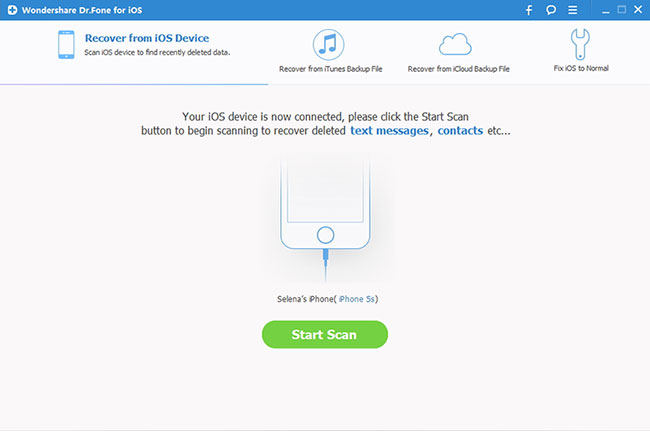
It’s not uncommon for people to accidentally delete data off their ios device. In fact, it’s more common than you think. What happens if that does occur? Meet Dr.Fone, the world’s first iPhone and iPad data recovery software. Dr.Phone is a full solution to recover deleted contacts, messages, photos, notes, etc. from iPhone, iPad and iPod touch.
Dr.Fone for iOS is the more comprehensive data recovery solution in the market. You can recover lost data directly from iOS devices or retrieve backups from both iTunes and iCloud. In just a few clicks, what was lost is suddenly found, pretty cool, right? The most common method is to connect the device by USB to a computer, at which point you can export any recoverable files. If you use this method, you can salvage files including contacts, reminders, WhatsApp history, messages, call history, Safari bookmarks, notes and calendars.


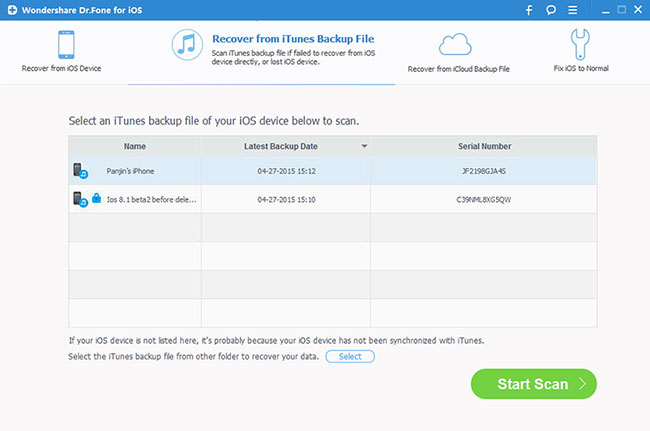
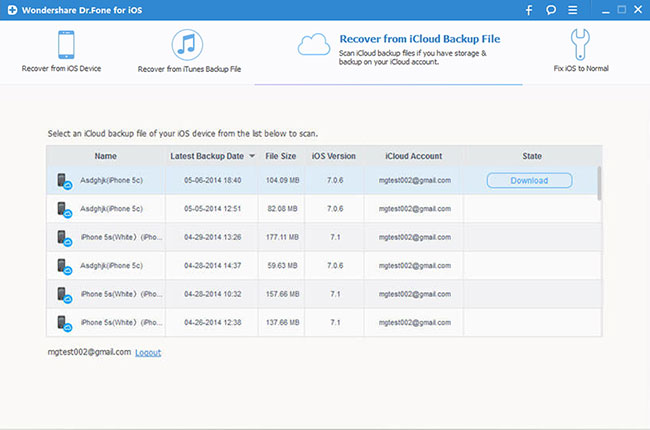
If you’re unable to perform a direct export from your device, Dr. Fone can utilize backup files embedded in an iTunes backup, whether on a computer or an external hard drive. The iPhone recovery software can also obtain backup files from iCloud. Both of these backup methods can recover all the file types that are recoverable from a direct scan, in addition to iMovie, iPhoto, Camera Roll, photo stream, Kindle, Keynote, voice memos and voicemail files. Recovery via these methods is contingent upon the device having previously been synced to either before data loss occurred.
Dr. Fone also features a preview function, allowing you to peruse the deleted files before recovering them so that you know exactly what you’re recovering. This cuts down on unnecessary storage and allows you to verify each item to ensure its value. This feature is particularly useful if you want to recover iPhone photos lost due to accidental deletion.
One-stop data recovery solutions is full of hints and tips to walk you through the iOS data recovery process. For example, if you are backing up from iTunes and the backup files are encrypted, your Apple ID passcode will be necessary. Wondershare’s website includes directions for how to change your Apple ID passcode, in the event that you have forgotten the existing one.
Screenshots
drfoneforios-sc05
Directly Recover Data from iOS Devices: Connect your device and scan it for lost data on it.
Extract Data from iTunes backup: This iPhone data recovery tool can extract all contents in the iTunes backup for preview and recovery.
Extract Data from iTunes backup: This iPhone data recovery tool can extract all contents in the iTunes backup for preview and recovery.
drfoneforios-icloud02
Retrieve Data from iCloud Backup: Data in an iCloud backup also can be extracted by this iPhone data recovery software for preview and selective recovery.
fix-ios-01
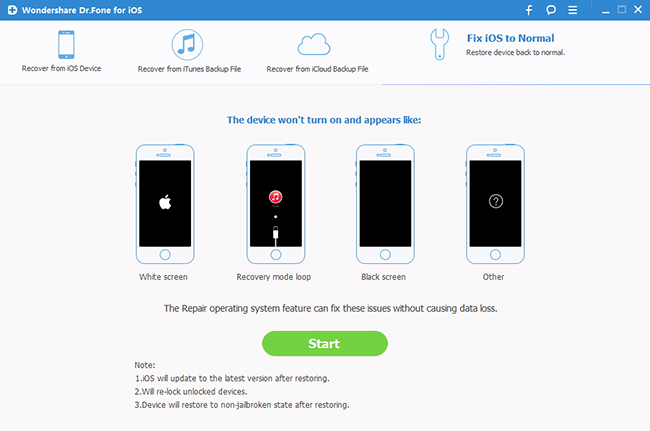
Preview Data before Recovery: The iPhone data recovery program allows you to preview all data from your iOS device, iTunes and iCloud backups, and then recover them on PC.
The company offers a fully functional free trial of this iPhone recovery tool, which ensures that customers are confident in their selection of Dr. Fone before investing in a copy for themselves. In addition to the free trial, the manufacturer also offers a 30-day money back guarantee (with some restrictions) to all who purchase the software. Once you purchase the software, Wondershare offers live-chat technical support, available 24 hours a day. This is important in the event you run into any usability issues while performing data recovery on your iOS device.
Wondershare’s website takes great pains to assure you that your privacy is thoroughly protected, through both data encryption and advanced fraud protection. Such claims may well be the distinguishing factor that sets Dr. Fone apart from its competitors.


Unlimited International Call - Airtel Talk

Airtel Talk

BB Rec

iPhone Screenshot 1
iPhone Screenshot 2
iPhone Screenshot 3
iPhone Screenshot 4


Barcode Generator

Free (no adFree (no ad