Free AI Tools, Apps & Prompts That Actually Work
Simple, tested, and ready to use
Showing posts with label Computer. Show all posts

Wednesday, 5 April 2017

Watch IPL 2017 Live On Your Android, IPhone And PC | MALAYALAM | NIKHIL KANNANCHERY


Hello friends,do you want to watch IPL on your android smartphone?watch any ipl matches only using your android mobile phone.it is easy.just you need to download the specific application which i am going to introduce and you can watch the matches without any difficulty. See live scores,new match notifications and all other ipl details through this app. so you must download the app and share with your friends and relatives.this app is not available in playstore. so you can get it from below link. this is a great oppertunity fo those who have android. make use of this wonderful application. Thank you


Android

Iphone

Computer

Tuesday, 28 February 2017

Cloud Storage


Cloud storage is a cloud space or storage location in which data is stored on remote servers accessed from the Internet, or "cloud." Cloud storage is maintained, operated and managed by a cloud storage service provider on a storage servers that are built on virtualization techniques.


Cloud storage is also known as utility storage - a term subject to differentiation based on actual implementation and service delivery.

There are three main cloud-based storage architecture models which are public, private and hybrid.


Download Links:

Friday, 19 August 2016

Dr phone

It’s not uncommon for people to accidentally delete data off their ios device. In fact, it’s more common than you think. What happens if that does occur? Meet Dr.Fone, the world’s first iPhone and iPad data recovery software. Dr.Phone is a full solution to recover deleted contacts, messages, photos, notes, etc. from iPhone, iPad and iPod touch.
Dr.Fone for iOS is the more comprehensive data recovery solution in the market. You can recover lost data directly from iOS devices or retrieve backups from both iTunes and iCloud. In just a few clicks, what was lost is suddenly found, pretty cool, right? The most common method is to connect the device by USB to a computer, at which point you can export any recoverable files. If you use this method, you can salvage files including contacts, reminders, WhatsApp history, messages, call history, Safari bookmarks, notes and calendars.


If you’re unable to perform a direct export from your device, Dr. Fone can utilize backup files embedded in an iTunes backup, whether on a computer or an external hard drive. The iPhone recovery software can also obtain backup files from iCloud. Both of these backup methods can recover all the file types that are recoverable from a direct scan, in addition to iMovie, iPhoto, Camera Roll, photo stream, Kindle, Keynote, voice memos and voicemail files. Recovery via these methods is contingent upon the device having previously been synced to either before data loss occurred.
Dr. Fone also features a preview function, allowing you to peruse the deleted files before recovering them so that you know exactly what you’re recovering. This cuts down on unnecessary storage and allows you to verify each item to ensure its value. This feature is particularly useful if you want to recover iPhone photos lost due to accidental deletion.
One-stop data recovery solutions is full of hints and tips to walk you through the iOS data recovery process. For example, if you are backing up from iTunes and the backup files are encrypted, your Apple ID passcode will be necessary. Wondershare’s website includes directions for how to change your Apple ID passcode, in the event that you have forgotten the existing one.
Screenshots
drfoneforios-sc05
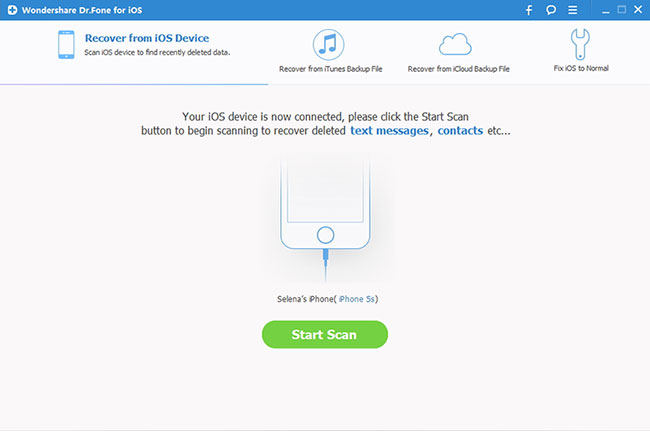
Directly Recover Data from iOS Devices: Connect your device and scan it for lost data on it.
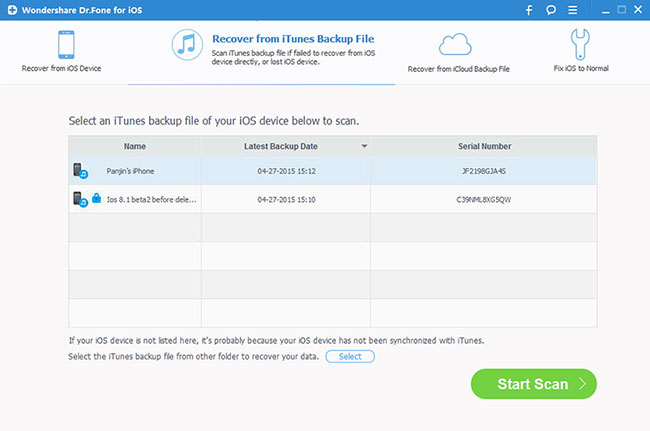
Extract Data from iTunes backup: This iPhone data recovery tool can extract all contents in the iTunes backup for preview and recovery.
Extract Data from iTunes backup: This iPhone data recovery tool can extract all contents in the iTunes backup for preview and recovery.
drfoneforios-icloud02
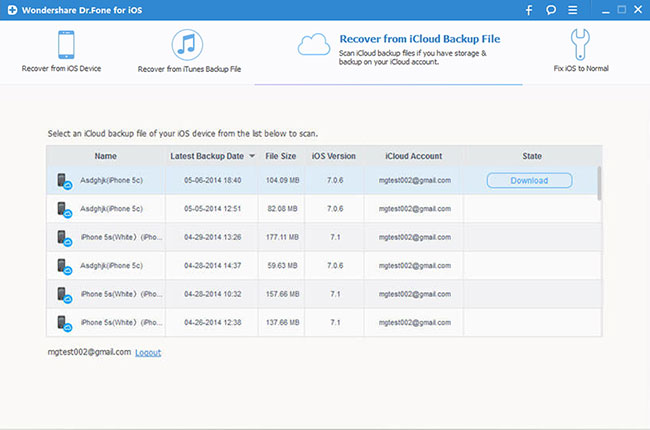
Retrieve Data from iCloud Backup: Data in an iCloud backup also can be extracted by this iPhone data recovery software for preview and selective recovery.
fix-ios-01
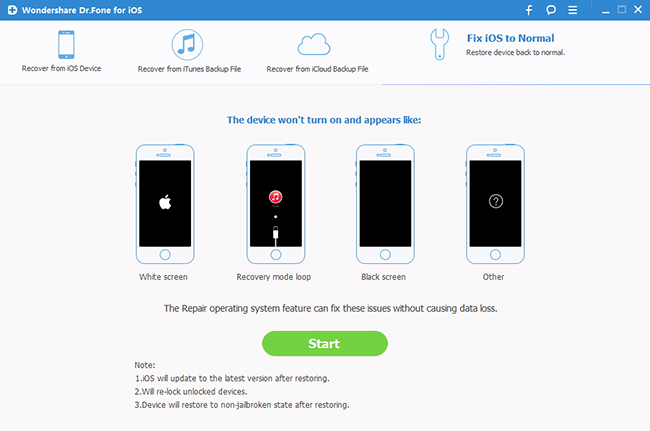
Preview Data before Recovery: The iPhone data recovery program allows you to preview all data from your iOS device, iTunes and iCloud backups, and then recover them on PC.
The company offers a fully functional free trial of this iPhone recovery tool, which ensures that customers are confident in their selection of Dr. Fone before investing in a copy for themselves. In addition to the free trial, the manufacturer also offers a 30-day money back guarantee (with some restrictions) to all who purchase the software. Once you purchase the software, Wondershare offers live-chat technical support, available 24 hours a day. This is important in the event you run into any usability issues while performing data recovery on your iOS device.
Wondershare’s website takes great pains to assure you that your privacy is thoroughly protected, through both data encryption and advanced fraud protection. Such claims may well be the distinguishing factor that sets Dr. Fone apart from its competitors.


Nox App Player

The Noxapp Player is a program that “transforms” your PC on an Android device. The software allows you to take advantage of the operating system of Google as if you were using any smartphone or tablet.


The application was built on Android 4.2.2 and now has the Google Play Store Facebook and a basic browser. It is possible to control everything using only the mouse clicks from the peripheral simulate the finishing touches on “screen” of the “apparatus”).
In addition to the basic functions of any smartphone or tablet, the Noxapp Player has a variety of tools to facilitate the use. In the menu, which is located on the right side of the interface, there are several important options for navigation.
nox player
A mapping of resources in the menu of the program is the “Simulate Touch”, which maps the device screen to recognize any keyboard button as a ringtone to a specific location on the display, as shown in the figure below:
In the example above, the interface of the game “Horizon Chase” has been mapped to recognize the keys listed as ringtones at points on the screen. In this case it was used the following configuration:


Space Bar: uses the accelerator;
Shift: activates the nitro;
keys A and D: they saw the car;
P Key: Pause the game.
This is a model of mapping, however many others can be used, depending on the preference of the player and the type of game. After deciding on the best way, simply click “Save” at the top of the screen.
This simulation of rings doesn’t just work for games; any application can use the tool in the same way.


The Noxapp Player also allows you to record everything that happens on your screen in video, close applications with just one touch, has system of geolocation, accept joysticks, besides turning .APK quickly doing a scan on your PC.


Tuesday, 16 August 2016

Vanity Remover

Project Description

This application removes all sub-folders (and the folder itself) where vanity is found. In other words: Recursivly checks for and deletes empty folders. Simple as that.

Capture.PNG


How to use:

  1. Download and run.
  2. Select a folder, by either:
    1. Typing it in to the textbox.
    2. Choosing it with the folder dialog (click the button next to the textbox).
    3. Drag and drop a folder from explorer unto the application.
  3. Press enter or click the green arrow.

What will happen:

  1. Progressbar will start having fun.
  2. Given folder and all sub-folders will be checked recursively for contents. Those that are empty will be deleted.
  3. Progressbar will stop.
  4. Number of scanned and deleted folders will be reported.

Note: The given folder itself will also be deleted if it ends up being empty.

Other uses:

None really. But if you for example would like to learn how you can do a simple drag and drop like that, take a look at the source code :-)
Last edited Oct 27, 2009 at 1:37 AM by Svish, version 16