Free AI Tools, Apps & Prompts That Actually Work
Simple, tested, and ready to use

Saturday, 29 April 2017

Speed Camera Radar


This is an application that used to detect hazards on the road, such as speed cameras (red light camerasmobile ambush, static speed cameras ), bad roads, speed bumps and etc.
This application always use database of hazards that previously detected by other users. 
The latest version supports all the countries of the world!


a. If you just installed the app you will need to go to menu "Update database" to download and install the latest database of speed camera for your region (country).
b. To run the hazard detection mode, press the "Start" button. at the bottom right of the screen.
c. The application notifies only the dangers that are along your route.
d. You can call main setting, swiping from the left edge of the screen to the right.
e. To add a new danger, tap on the SPEED at the bottom of the screen.
f. Sign in to edit and remove current POI


++++ Features ++++

Night mode for Map is supported (enabled in settings)
> Map or Radar view mode (no need Internet to render data)
> Night mode adjustment on screen 
> Map auto zoom and rotation map along the way
> 3D tilt on map support (3D buildings)
> Dashboard with current speed 
> Daily database updates!
> 160 000 active hazards POIs around the world (check your country in FREE version of this APP at first)
> Support voice alerts
> You can add their own POI to shared database
> Support of working in background or with other Navigation APPs

Sunday, 23 April 2017

Unsent WhatsApp Messages


Everybody knows that sometime before, WhatsApp added a feature that users can send bold, italic and strike through text by adding
• Bold: Add an asterisk (*) before and after the specific words or phrases you want to embolden e.g. *hello*
• Italics: Add an underscore (_) before and after your chosen words or phrases e.g. _hello_
 Strikethrough: Add a tilde (~) before and after the words or phrases you want to strike a line through e.g. ~hello~
But now WhatsApp added its this option thorough shortcuts in its latest versions. For that simply select a word when you type messages. Then You will see options for Bold, Italic and Underscore. Fore more watch video below.

Friday, 21 April 2017

Material Status Bar Notific


Material Status Bar is the first android appto give you a Lollipop/ Marshmallow status bar with Material Designlook and feel.
It supports all devices running Android 4 (4.0 - 4.4) and isintended to be a full-featured status bar.

Features
◉ Three theme styles: Lollipop, Gradient and Flat (iOS)
You can choose to have the newest and sweetest theming of colorswith a darker accent,
Or, if prefer use Flat Design to match iOS 9 in terms ofaesthetics.

◉ Notification Panel with different themes
Tablet - ready design.

◉ Material Design
Feel the vibe of the most exciting design language in every app yougo.

◉ Colorization/ tinting for every app
Tint your experience everywhere you go.

◉ Notifications
Read your notifications right from your notification panel.

◉ Brightness slider and Auto-Brightness
◉ Color Picker
◉ Auto-hide in full screen mode
◉ Auto-start when phone powers on
◉ Battery Percent
◉ 12 and 24 Hour Format
◉ Going to have way more features

For more information see the Help & About section inside theapp.
Please note that this is a beta version and should be treated assuch. But it's definitely fully working.

Volume Scroll [NO ROOT]


If you install this application, You can scroll your device by pressing volume buttons or a scrollling buttons on the screen
At 75.4 KB, Volume Scroll lets you scroll through pages on almost any App using your Volume Rocker. And yes, you read the title of the App right, it requires NO root permission.

Once activated, scroll a tiny bit of the content you want to be scrolled using Volume Rocker. Pressing either of the volume keys will make a paginated scrolling (jumps to new content, flips a page - however you may like to understand.)

This will feel very natural and immersive, especially when you want to consume a really long article on Google Chrome or an endless feed of Facebook, Instagram and many more applications.

What happens to adjusting volume? Well, a long press on either of the Volume keys will activate the default behavior (bringing volume control panel on screen.) Neat?

In addition to scrolling through Volume Rocker, there is an optional onscreen buttons as well. The onscreen buttons will appear when there is a scrollable content available on screen, and if no action is taken on the button, they fade within 2 seconds - and appear back, if you manually scroll some content.

So far, the App works on all popular chatting Apps, Social Media Apps, GMail, Google Chrome etc. However, don't be surprised if it doesn't work on your pdfs or some 3rd party browsers - that will be due to technical limitation.

AutoHash


A hashtag is a type of label or metadata tag used on social network and microblogging services which makes it easier for users to find messages with a specific theme or content. Users create and use hashtags by placing the number sign or pound sign (colloquially known as the hash character # in reference to its resemblance to several slices or chops with a sharp implement) in front of a word or unspaced phrase, either in the main text of a message or at the end. Searching for that hashtag will yield each message that has been tagged with it. A hashtag archive is consequently collected into a single stream under the same hashtag. For example, on the photo-sharing service Instagram, the hashtag #bluesky allows users to find all the posts that have been tagged using that hashtag.

Because of its widespread use, hashtag was added to the Oxford English Dictionary in June 2014.The term hashtag can also refer to the hash symbol itself when used in the context of a hashtag.


Calculator Vault- Gallery Lock


This application will help you to lock your apps and hide your files inside of a calculator.


Double Tap Screen On and Off


By using this application You can turn on and off your android phone's display on and off


Friday, 7 April 2017

Arrow Launcher


The ultimate in customization. Arrange apps , or have your apps ranked based on daily usage.
Quickly get back to your recent activity: phone calls, text messages, photos, file downloads, and app installs. 
Every action is just a tap away.No more hunting around your phone contact list. 
Easily find and contact the people who matter the most.Never forget anything again. 
Receive your reminders everywhere on your on the WebPC, and on your phone.Access your most important Office documents on the cloud, and easily share them with friends.

Lens Launcher


Lens Launcher is a unique, efficient way to browse and launch your apps.
Instead of scrolling long lists or swiping through multiple pages


ZenUI Launcher-Theme,Wallpaper


You can customize Zen UI launcher Launcher the way you want: apply your favorite themes, widgets and wallpapers, change app icons, apply scroll effects or transitions, or organize your apps in folders. Secure your apps from prying eyes with integrated app locking features.

= Show your personality on your Android devices using different free wallpapersfree themes, icons, effects and transitions! You can even set different wallpapers in home screen and lock screen to make it more fun and interesting.Customize the icon size, font size, or font style of your app and widgets on the home screen, lock screen, and all apps screen.

= Download complimentary themes and icon packs with Launcher theme shortcut.
= Organize your folders and apps in One layer mode (access all apps on home screen) or Two layer mode (access apps using a shortcut).
= Auto-group related apps using Smart Group feature to keep your screen organized.
= Get a sneak live preview on your screen when customizing your wallpapers, themes, fonts, and more!


OF Launcher- New Launcher 2016 (Unreleased)


OF Launcher have a clean desktop without widgets and icons everywhere. You can also add more folders and arrange your favorite apps to always be within your reach. It smartly organizes your apps to  smart folders and shows them at the home screen bottom so that you can touch every app with just one finger. 

OF Launcher is doing everything OF your Android home screen which lets you do what you want faster. It allows convenient access to your favorite apps, switches and all your phone widgets using just one hand, system settings.


OF Launcher let you give every smart folder a wallpaper which shows on your phone screen. You can set your pictures or even stars’ posters as smart folders’ wallpapers, these personalized wallpapers will make your phone stylish.

OF Launcher has 10+ desktop gestures including icon gestures, folder gestures, reachable gestures which make you feel comfortable to use it. You just have to slide and swipe to manage your Android, and the quick access app drawer let you get where you need to go comfortably. 


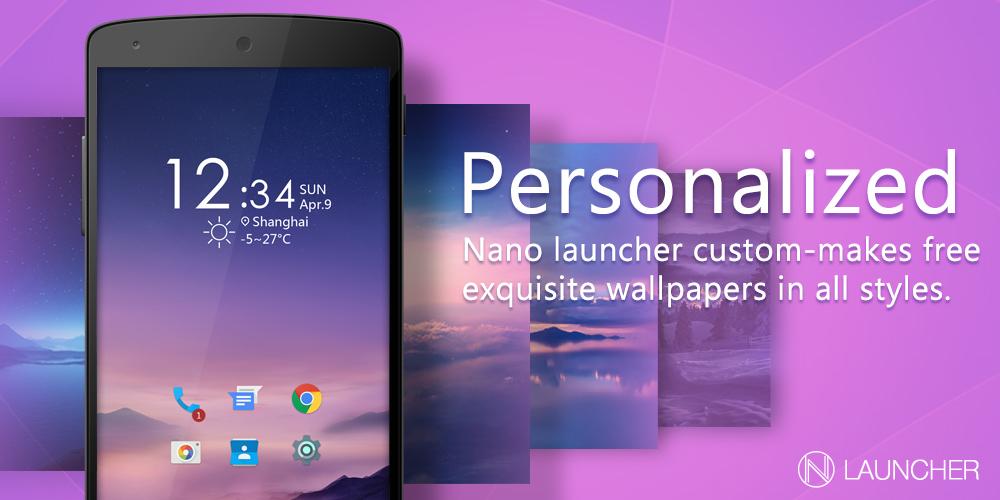
Nano Launcher-simple&smart


May be Nano Launcher is the smartest and smallest launcher in the world. It only 2MB large so it will not occupied too much space in your phone. This amazing launcher will bring you a totally different experience. Make your phone like new. We cut some unnecessary features, keep the most important features people need.Nano launcher want to avoid people being a phubbing. We know users will have a more efficient life,  so Nano will give some reminders while you are overusing your phone. Hope you will like Nano and enjoy.

Wednesday, 5 April 2017

Watch IPL 2017 Live On Your Android, IPhone And PC | MALAYALAM | NIKHIL KANNANCHERY


Hello friends,do you want to watch IPL on your android smartphone?watch any ipl matches only using your android mobile phone.it is easy.just you need to download the specific application which i am going to introduce and you can watch the matches without any difficulty. See live scores,new match notifications and all other ipl details through this app. so you must download the app and share with your friends and relatives.this app is not available in playstore. so you can get it from below link. this is a great oppertunity fo those who have android. make use of this wonderful application. Thank you


Android

Iphone

Computer